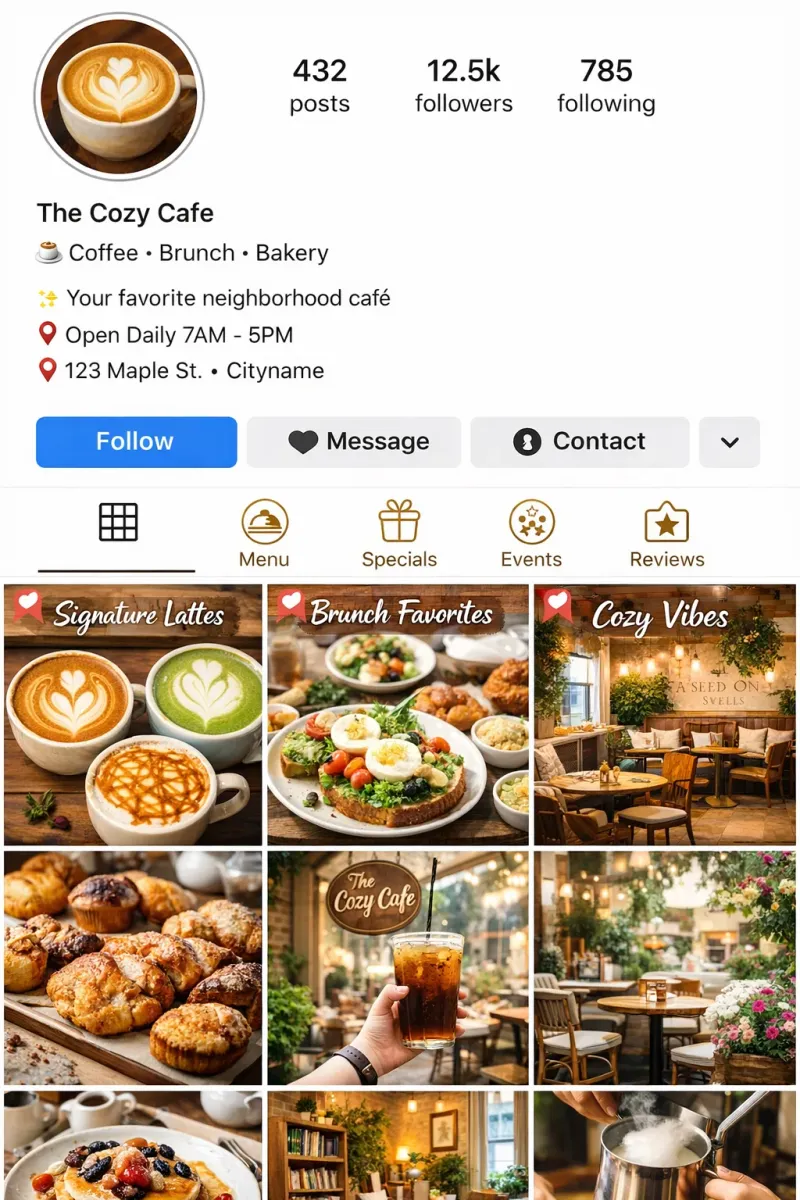

Your Instagram profile should help a new visitor decide whether your business is relevant. Use the bio, grid, and pinned posts to make that decision easier.
Most Instagram feeds are posted into, not designed. A florist posts a bouquet. A coffee shop posts a latte. A gym posts a motivational quote. And when someone visits the profile for the first time, they see six random posts in whatever order they were uploaded - no thread, no story, no reason to follow.
That’s a missed opportunity every single time.
New visitors don’t scroll back through months of content to understand who you are. They look at what’s visible right now - roughly the first two rows of your grid - and make a decision in about three seconds. If those six posts don’t tell a coherent story, they leave.
Pinned posts give you a fixed place to explain the business before a visitor starts judging the rest of the grid. Once those first six visible posts tell a coherent story, the profile has a chance to do its job.
What pinned posts are and why most people use them wrong
Instagram lets you pin up to three posts to the top of your profile. They stay there permanently - regardless of when they were posted - and they occupy the first three visible positions on your grid.
Most people either don’t use pinned posts at all, or they pin whatever got the most likes. Both are missed opportunities. Your most-liked post from eighteen months ago is not necessarily the post that tells a new visitor who you are or why they should follow you.
Pinned posts are a profile tool, not a greatest-hits section. They exist to answer one question on behalf of someone who has never seen your account before: “What is this account, and should I follow it?”
Pinned posts aren't for your existing followers. They're for the person who just found you and is deciding in ten seconds whether to stay.
Here’s how to think about the three slots:
Pin 1 - Who you are and what you do. This is your introduction post. It explains your business clearly, ideally with your face in it. It answers: what do I sell, who is it for, why am I the right person to buy it from? A talking-head Reel works well here. So does a carousel that walks through your story or your process. What doesn’t work: a product flat-lay with no context.
Pin 2 - Your best offer or most important service. Not a sale, not a discount - the thing you most want new customers to understand or enquire about. If someone is going to take one action after visiting your profile, what do you want it to be? This post should make that action obvious.
Pin 3 - Social proof. A real customer review, a before-and-after, a result. Something that shows your work through someone else’s experience rather than your own description of it. People trust other people’s accounts of a business far more than the business’s own account of itself. BrightLocal’s 2026 Local Consumer Review Survey - drawing on 1,002 US consumers - found that 97% of people read online reviews for local businesses, 85% say positive reviews make them more likely to use a business, and nearly half (49%) trust online reviews as much as a personal recommendation from someone they know. Social proof on your profile isn’t decorative - it’s one of the main things a first-time visitor is looking for before they decide whether to follow or contact you.
The next three posts - what row two should show
Your pinned posts handle the introduction. The three posts directly below them - row two of your grid - are what a visitor sees immediately after. If the pins bought you credibility, row two should show the texture of your content: what it’s actually like to follow you.
This is where a lot of profiles break down. Row two is often just whatever was posted most recently, with no thought to what it communicates to someone seeing it for the first time.
Row two should do three things:
Show your content variety. If all six posts look the same, a visitor assumes that’s all you do. One post should demonstrate value or education - something that shows you know your field. One should show personality - behind-the-scenes, process, your actual working environment. One should be product or service focused, but from a different angle than Pin 2.
Confirm your voice and visual style. Consistency isn’t about using the same filter. It’s about whether these posts feel like they came from the same person. A visitor scanning six posts in three seconds is reading tonal consistency as much as anything else.
Give a reason to keep scrolling. Row two is where someone decides whether to follow - and what they’re actually signing up for. If it looks interesting and varied, they follow. If it looks like the same post repeated six times, they don’t.
| Business | Pin 1 (Who you are) | Pin 2 (Core offer) | Pin 3 (Social proof) | Row 2 post A | Row 2 post B | Row 2 post C |
|---|---|---|---|---|---|---|
| Florist | Reel: your face + your story in 30 sec | Carousel: wedding / event packages | Customer review with photo of finished arrangement | Behind the scenes: sourcing flowers at market | Educational: '3 flowers that last 2 weeks' | Product post: current seasonal arrangement |
| Hair studio | Talking-head Reel: who I work with and what I specialise in | Before/after carousel: your signature service | Screenshot review + result photo | Educational: 'How to maintain a balayage at home' | Behind the scenes: a day in the chair | Product: current availability or booking CTA |
| Personal trainer | Reel: your approach and why it's different | What a programme looks like + how to start | Client transformation with their words | Educational: common mistake you see | Personal: why you started training | Workout post or training content |
| Café / food business | Reel: the space, the team, the vibe | Signature product or seasonal special | Customer photo or user-generated content | Behind the scenes: morning prep or baking | Educational: ingredient story or sourcing | New or seasonal menu item |
Blending AI content with organic posts - the 5:2 framework
Here’s the conversation most small business owners are having privately but not openly: they’re using AI to help write captions, generate post ideas, or produce text-based content - and they’re not sure how much is too much.
It’s a fair question. HubSpot’s 2026 State of Marketing Report found that 94% of marketers plan to use AI in their content creation processes this year. AI isn’t a fringe tool anymore - it’s part of how content gets made. The question isn’t whether to use it. It’s where it helps and where it hurts.
The framework I’d suggest for small businesses is a 5:2 ratio: for every seven posts, five can lean on AI for drafting, structuring, ideation, or repurposing - and two should be unambiguously you, your real environment, your actual voice, your face, your work, your genuine opinion.
The test for any piece of content isn't 'did AI help write this?' It's 'could only this business have posted this?' If the answer is no, it doesn't matter who wrote it.
— A useful question to ask before posting
This isn’t a strict rule. It’s a way of scaling your output without burning out. AI handles the volume; your two organic posts per week are the anchor - they’re what gives your followers a reason to trust everything else.
Where AI genuinely helps - and where it doesn’t
Where AI works well for small businesses on Instagram:
Caption drafting. You know what you want to say. AI helps you say it faster and with a stronger hook. The input is yours; the assistance is in execution. Sprout Social’s 2025 research found that engagement is highest when captions feel personal and specific - AI can help with the structure, but the specific details (your customer’s name, the job that took three hours longer than expected, the supplier you just switched from) have to come from you.
Post idea generation. Blank-page paralysis is real. Using AI to generate ten post ideas and then picking two you actually want to make is a legitimate workflow. You’re not outsourcing your creativity - you’re shortcutting the part that wastes the most time.
Text-based carousel slides. Educational carousels with clear, punchy slide copy are one of the highest-engagement formats on Instagram right now. AI is very good at drafting these if you give it clear input about your topic and audience.
Repurposing existing content. Turning a long caption into a Story text slide, or a blog post into a carousel script - these are mechanical transformations that AI handles well.
Where AI tends to undermine credibility:
Faceless, generic imagery. AI-generated images of “a beautiful café” or “a florist at work” are identifiable at a glance. They have no specificity - no real space, no real person, no real light. Instagram’s most effective content is specific. Generic images, whether AI-made or stock, tend to perform below average because they don’t give people anything real to connect with.
Captions that don’t sound like you. If you normally write in short, direct sentences and your AI-assisted post reads like a LinkedIn article, your regular followers will notice. The tells are subtle but real: longer sentences, slightly formal vocabulary, phrases like “dive deep” or “at the end of the day.” Audiences pick up on tonal inconsistency even when they can’t name it.
Trend-chasing templates. The audio trend that’s already peaked by the time you post it, the format that looks right but has no connection to your actual content - these post fine in isolation but erode the coherence of your feed over time.
Putting it together: a practical weekly rhythm
If you’re posting four times a week, a 5:2 framework across a fortnight (14 posts) would give you ten AI-assisted posts and four that are fully organic. In practice, a single week might look like:
- Monday: AI-assisted - an educational carousel drafted with AI, using your own examples and specifics
- Wednesday: AI-assisted - a caption-led post about your service, AI-drafted and then edited in your voice
- Friday: Organic - a real photo with a caption written entirely by you, from something that happened this week
- Saturday: AI-assisted - a tips post, product showcase, or repurposed content piece
Then once a fortnight, swap one of the AI-assisted slots for something fully personal - a client story, a behind-the-scenes moment, a genuine opinion.
The rhythm matters more than the exact split. What the two organic posts do is anchor the other five. They’re proof that a real person is behind the account - and that proof is what makes the AI-assisted content feel credible rather than hollow.
Meta’s guidance on Instagram content strategy consistently emphasises authenticity and original content as the primary drivers of reach and recommendation. The algorithm actively deprioritises content that’s been widely reshared or that lacks original creative input. Your organic posts are what give you standing with the algorithm and with your audience.
Common questions about Instagram profile strategy
How many posts can I pin on Instagram?
Instagram currently allows up to three pinned posts. They appear in the first three positions of your grid - the top-left row - regardless of when they were originally posted. You can pin and unpin posts at any time by tapping the three dots on a post and selecting “Pin to your profile.” There’s no limit to how long you leave a post pinned; many small businesses update their pins quarterly to reflect seasonal offers or current priorities.
Should I pin Reels or static posts?
Either works, but Reels tend to perform better as Pin 1 - your introduction - because video communicates personality more efficiently than a static image. Someone can understand who you are, what your energy is like, and what you do from a 30-second Reel in a way that a photo can’t replicate. For Pin 2 (your core offer) and Pin 3 (social proof), carousels often perform well because they give people more information before they have to decide whether to follow.
Does using AI for captions hurt my reach?
Instagram’s algorithm does not penalise AI-written captions as such - it has no way to detect them at the caption level. What the algorithm does measure is engagement: how many people save, comment, share, and follow as a result of a post. AI-written captions that sound generic, don’t prompt responses, or feel disconnected from the image will underperform - not because of their origin, but because they don’t create engagement. The practical issue isn’t detection; it’s that AI captions without specific, personal input tend to be less engaging.
How often should I update my pinned posts?
A good rule of thumb is to review your pinned posts whenever something significant changes - a new service, a new price point, a strong recent testimonial, or a seasonal shift. If nothing has changed, there’s no need to update them. Some businesses leave the same pins for six months or more; others refresh them monthly. The important thing is that they always represent your current best introduction to a new visitor, not just your most popular post from the past.
What is the 5:2 framework for AI content?
The 5:2 framework is a practical ratio: for every seven Instagram posts, five can lean on AI for drafting, structuring, captioning, or ideation - and two should be authentically and specifically you, real photos, your genuine voice, content that only your business could have posted. It’s not a strict rule. It’s a way of scaling your content output without burning out, while keeping enough organic posts in the mix to anchor your credibility. The two unambiguously human posts are what give the other five their context.
If the bio and pinned posts still feel hard to judge from inside the business, review the profile with the Profile Audit and check the bio separately.